How to Watch NFL Games Live in 2026: Complete IPTV Streaming Guide
As the 2026 NFL season approaches, football fans across the globe are seeking flexible, high-performance ways to catch every touchdown, field goal, and game-winning drive. Modern broadcasting rights are increasingly split across traditional television networks, digital streaming platforms, and international subscription passes. Navigating this fragmented media landscape requires a clear understanding of how to watch NFL games online while ensuring maximum picture clarity, reliable playback, and cross-device convenience.
Whether you follow Thursday Night Football, Sunday afternoon regional matchups, Sunday Night Football marquee games, or Monday Night Football clashes, establishing a dependable streaming environment is key. In this comprehensive guide, we will break down the essential details for the 2026 NFL season, evaluate modern streaming technologies including Internet Protocol Television (IPTV), explain device compatibility, outline internet speed requirements, and provide step-by-step troubleshooting tips to help you optimize your live sports viewing setup with Flash4K IPTV.
Stream 2026 NFL Games in 4K & 60FPS
Get instant access to over 50,000 live sports channels, 120,000+ movies & series, and 24/7 priority sports coverage across all your favorite devices.
1. What to Know About the 2026 NFL Season
The 2026 NFL season marks the 107th season of the National Football League, featuring an 18-week, 17-game regular-season schedule for all 32 franchises. Staying informed about official season key dates and schedule flexibilities ensures you never miss a kickoff.
Key Dates for the 2026 NFL Season
- Regular Season Kickoff: The 2026 regular season is scheduled to begin in early September 2026, traditionally launched by the reigning Super Bowl champion hosting the NFL Kickoff Game on Thursday night.
- International Series Games: The 2026 international schedule expands the league's global footprint with verified games held in London (Wembley Stadium and Tottenham Hotspur Stadium), Munich (Allianz Arena), and Madrid (Santiago Bernabéu Stadium), along with regular international fixtures in São Paulo and Mexico City.
- Regular Season Finale: Week 18 concludes in early January 2027, featuring division-only matchups to decide final playoff berths and seeding.
- NFL Playoffs: The postseason commences with Super Wild Card Weekend in mid-January 2027, followed by the Divisional Playoffs and Conference Championship games in late January 2027.
- Super Bowl LXI: Super Bowl LXI is scheduled to take place on Sunday, February 14, 2027, at Levi's Stadium in Santa Clara, California.
Note: NFL kickoffs, game flexibilities, and network assignments are managed directly by the NFL. Always verify specific local broadcast schedules closer to game day via official league channels or Flash4K IPTV channel directory.
2. How Can You Watch NFL Games Live in 2026?
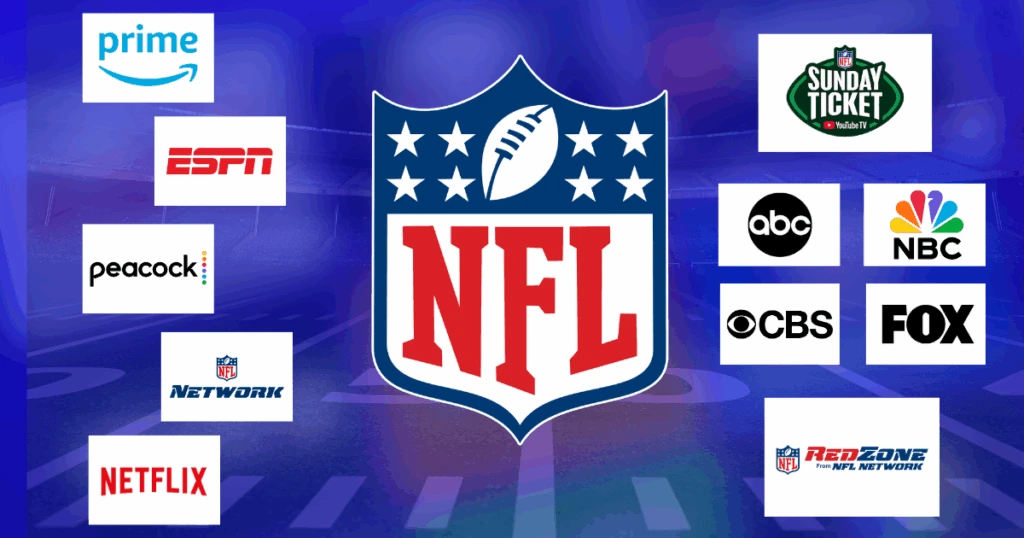
Broadcast rights for the 2026 NFL regular season and postseason remain distributed across multiple broadcast television networks, cable stations, and exclusive digital streaming platforms. Depending on your geographic location and subscription setup, viewers utilize several primary pathways:
Traditional Television Networks
In the United States and select international markets, local over-the-air (OTA) and cable networks broadcast designated regional games:
- Sunday Afternoon Games: Broadcast regionally across CBS (AFC package) and FOX (NFC package).
- Sunday Night Football: Broadcast nationally on NBC and simultaneously streamed digitally.
- Monday Night Football: Broadcast nationally on ESPN, with select simulcasts on ABC.
Network Digital Streaming Platforms
Major networks offer digital streaming options for subscribers within specific territorial boundaries:
- Paramount+: Streams local live CBS broadcast games.
- Peacock: Streams NBC Sunday Night Football games and select exclusive wild card playoff games.
- ESPN+: Select Monday Night Football simulcasts and exclusive international game broadcasts.
- Amazon Prime Video: Exclusive domestic rights for Thursday Night Football.
Official League Streaming Passes
For out-of-market or international fans, official league solutions offer tailored coverage:
- NFL+ (US domestic): Offers live local and primetime regular season games on mobile devices and tablets, alongside live out-of-market preseason games.
- NFL Game Pass via DAZN (International): Delivers live coverage of every regular-season matchup, playoff game, and Super Bowl LXI for subscribers located outside the United States and China.
IPTV Services
Internet Protocol Television (IPTV) has emerged as a popular, flexible alternative for sports enthusiasts who prefer consolidating live TV networks into a unified player interface. By delivering live television channels over standard internet protocol suites, IPTV enables viewers to access live sports broadcasts on compatible Smart TVs, streaming sticks, and mobile devices through an internet connection.
3. What Is IPTV and How Does It Work for Live Sports?
IPTV stands for Internet Protocol Television. Unlike traditional satellite dishes or coaxial cable infrastructure that transmit signals over physical copper or satellite frequencies, IPTV uses standard IP networks—the same infrastructure that delivers webpage data and on-demand video—to stream live television signals directly to your display.
For live sports like NFL football, IPTV player applications connect via M3U playlist URLs or Xtream Codes API logins to retrieve channel list metadata, decode compressed live media streams (encoded using H.264 or H.265/HEVC video codecs), and render smooth 60FPS video feeds directly onto your television screen. IPTV is valued for its ability to aggregate international sports networks, local broadcast affiliates, and dedicated sports channels into a single organized application without requiring multiple physical set-top boxes.
4. Can You Watch NFL Games with IPTV?
Yes, viewers can watch live NFL games using IPTV, provided their chosen IPTV provider includes the legitimate sports networks and regional broadcast affiliates carrying the games in their active channel lineup.
Coverage depends on several factors:
- Available Sports Channels: Ensure your IPTV service provides access to primary sports networks such as CBS affiliates, FOX affiliates, NBC, ESPN, and international sports networks (e.g., Sky Sports NFL, TSN, DAZN sports channels, or BeIN Sports).
- Channel Quality & Frame Rate: Live sports require high frame rates (50FPS or 60FPS) to keep fast-moving football action and passes smooth.
- Geographic Coverage: Channel availability can vary by region. Reviewing Flash4K IPTV coverage prior to major games allows you to confirm that desired sports channels are listed.
5. Why IPTV Can Be Convenient for NFL Fans
Opting for a modern IPTV service like the Flash4K service brings clear, practical advantages to sports fans seeking high-performance viewing setups:
- Unified Channel Navigation: Enjoy access to local news, regional sports networks, premium entertainment, and international channels within one continuous electronic program guide (EPG).
- Multi-Device Flexibility: Watch games on your main living room Smart TV, switch to an Android tablet in the kitchen, or stream on a smartphone while traveling.
- High-Definition & 4K Capabilities: Modern IPTV infrastructures support 1080p Full HD at 60FPS and select 4K Ultra HD streams for immersive sports viewing.
- Centralized EPG Guide: Effortlessly browse upcoming kickoff times, channel schedules, and pre-game shows directly within your IPTV player.
- Cost Efficiency: Consolidate expensive cable bundles into transparent, flexible Flash4K IPTV subscription plans.
Important Reminder: While IPTV offers significant convenience, performance relies entirely on your local home network stability, router configuration, and device decoding power. No service can guarantee zero buffering if local network congestion occurs.
6. Best Devices for Watching NFL with IPTV
Choosing the right hardware ensures snappy application navigation, instant channel switching, and fluid 60FPS video playback during critical 4th-quarter drives.
 Devices for watching NFL games with IPTV
| Device Category | Popular Models | Strengths for NFL IPTV Streaming |
|---|---|---|
| Amazon Fire TV | Fire TV Stick 4K Max, Fire TV Cube | Exceptional value, native Android app compatibility, hardware 4K 60FPS decoding, portable. |
| Android TV / Google TV | Chromecast with Google TV 4K, Nvidia Shield TV Pro, Formuler Z11 | Raw processing power, Gigabit Ethernet ports, customizable IPTV apps (TiviMate, IPTV Smarters), zero lag. |
| Smart TVs | Samsung Smart TV (Tizen OS), LG Smart TV (webOS) | Clean living room integration without extra cables; uses native webOS/Tizen IPTV applications. |
| Apple TV | Apple TV 4K (3rd Gen) | Ultra-fast A15 Bionic processor, crisp UI rendering, supported by top IPTV player apps like GSE Smart IPTV and IPTVX. |
| Mobile & Tablets | Apple iPad Pro, Android Tablets, iOS/Android Smartphones | Perfect for on-the-go streaming over 5G or high-speed mobile Wi-Fi networks. |
To configure your specific device hardware, follow our step-by-step Flash4K IPTV installation guide.
7. How to Set Up IPTV for NFL Streaming
Setting up an IPTV player for live sports streaming requires only a few minutes. Follow this beginner-friendly step-by-step workflow:
- Select a Compatible IPTV Service: Choose a high-performance provider such as Flash4K IPTV.
- Verify Sports Lineup: Confirm that your active package includes major sports networks and regional broadcast affiliates.
- Connect Your Streaming Device: Hook up your Firestick, Android Box, or Smart TV to your primary display.
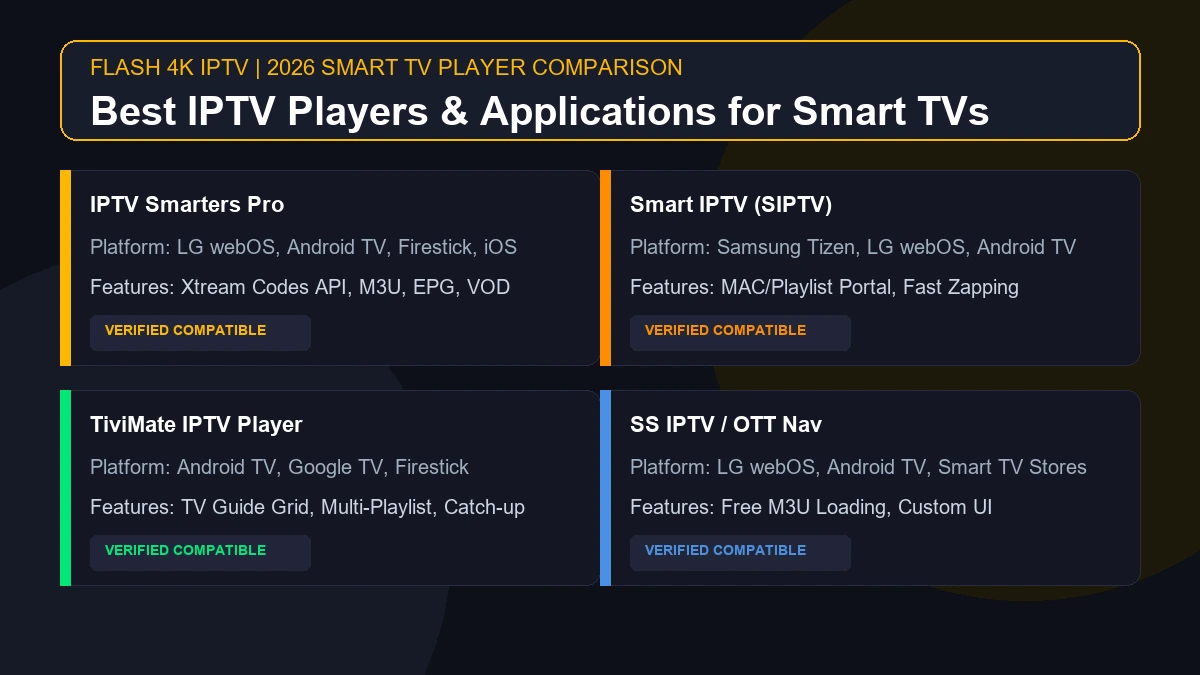
- Install a Recommended IPTV Player App: Download an established player application from your device store (e.g., TiviMate, IPTV Smarters Pro, XCIPTV, or Smart ONE IPTV).
- Enter Account Credentials: Input the Xtream Codes API parameters (Server URL, Username, Password) or M3U Playlist URL provided by Flash4K IPTV support team.
- Load Channel Playlists & EPG: Allow the application to populate channel categories and electronic program guide data.
- Organize Favorite Channels: Create a dedicated "NFL / Live Sports" favorites folder for quick access on game day.
- Test Stream Playback: Test channel load times and video smoothness 30 to 60 minutes prior to kickoff.
8. Internet Speed & Stability for NFL Streaming
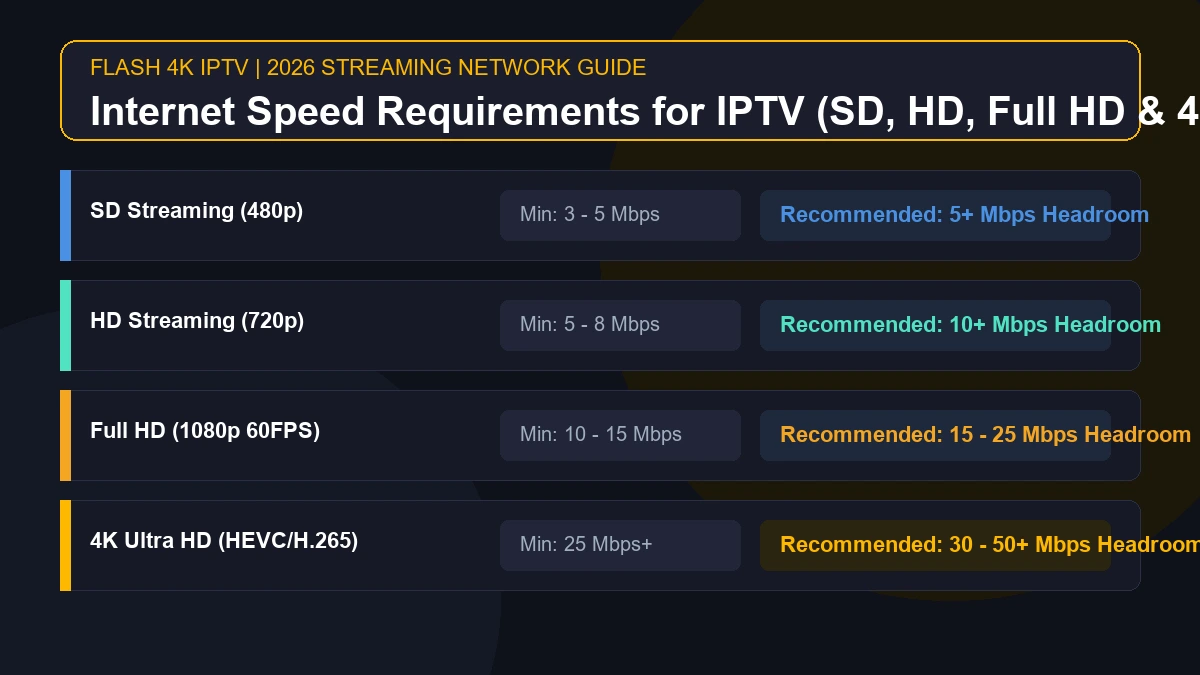
Live football streaming requires sustained download bandwidth and minimal packet loss to maintain high resolutions without dynamic bitrate drops or buffering wheels.
- HD Stream (720p / 1080p @ 30FPS): Minimum 10 - 15 Mbps download per device.
- FHD Stream (1080p @ 60FPS): Minimum 25 - 30 Mbps download per device.
- 4K Ultra HD Stream (2160p @ 60FPS): Minimum 50+ Mbps download per device.
Key Network Recommendations for Sports Enthusiasts
- Use Direct Wired Ethernet: Whenever feasible, connect your streaming box or Smart TV directly to your internet router using a Cat6 Ethernet cable. Physical wiring eliminates Wi-Fi signal interference and ping spikes.
- Utilize 5 GHz Wi-Fi Bands: If running a physical cable is impractical, connect your streaming device to your router's 5 GHz or Wi-Fi 6 frequency band rather than the congested 2.4 GHz band.
- Reduce Household Network Traffic: Avoid running heavy cloud backups, large video game updates, or multiple 4K downloads on other devices during game time.
- Verify ISP Speed Thresholds: Run an independent speed test to ensure your Internet Service Provider (ISP) is not throttling bandwidth during peak Sunday evening hours.
Stream 2026 NFL Games in 4K & 60FPS
Get instant access to over 50,000 live sports channels, 120,000+ movies & series, and 24/7 priority sports coverage across all your favorite devices.
9. How to Get the Best NFL Streaming Quality
Achieving crisp, stutter-free playback during live NFL broadcasts involves fine-tuning both your streaming device settings and display configuration.
 IPTV setup for streaming NFL games with a stable internet connection
Proven Tips for Maximum Video Clarity
- Enable Hardware Acceleration: Inside your IPTV player app settings (such as TiviMate or IPTV Smarters), set Video Decoder to Hardware (HW) or Hardware+. Hardware decoding uses your streaming box's GPU to process 60FPS video smoothly.
- Match Frame Rate (AFR): Turn on "Auto Frame Rate Matching" inside your IPTV app or Android TV display settings. This synchronizes your display's refresh rate (e.g., 60Hz or 120Hz) with the source stream (60FPS), eliminating motion judder during fast pass plays.
- Clear Application Cache: Periodically navigate to your device Settings > Apps > IPTV Player > Clear Cache to remove temporary files and keep app memory fresh.
- Reboot Router & Streaming Box: Perform a quick power-cycle of your network router and streaming stick 15 minutes before the pre-game show starts.
- Adjust TV Motion Smoothing: Set your television's picture mode to "Sports" or "Game Mode" to reduce input latency and disable excessive post-processing artifacts.
10. Common NFL IPTV Streaming Problems & Troubleshooting
Even with high-end equipment, technical issues can occasionally occur. Here is a quick-reference guide to resolve common playback problems rapidly:
Problem 1: Stream Buffering or Frequent Freezing
- Primary Causes: Local network congestion, weak Wi-Fi signal, ISP bandwidth throttling, or temporary server load.
- Quick Fixes:
- Switch from Wi-Fi to a wired Ethernet cable.
- Restart your home router and streaming device.
- Change the buffer size setting in your IPTV player from "None" to "Medium" or "Large".
- If your ISP throttles sports traffic, connect through a recommended high-speed VPN server.
Problem 2: Channel Fails to Load or Black Screen
- Primary Causes: Outdated playlist data, temporary stream link maintenance, or app memory freeze.
- Quick Fixes:
- Force-close the IPTV application and reopen it.
- Select "Update Playlist" or "Update EPG" inside your application settings.
- Try an alternative regional broadcast channel carrying the same NFL matchup.
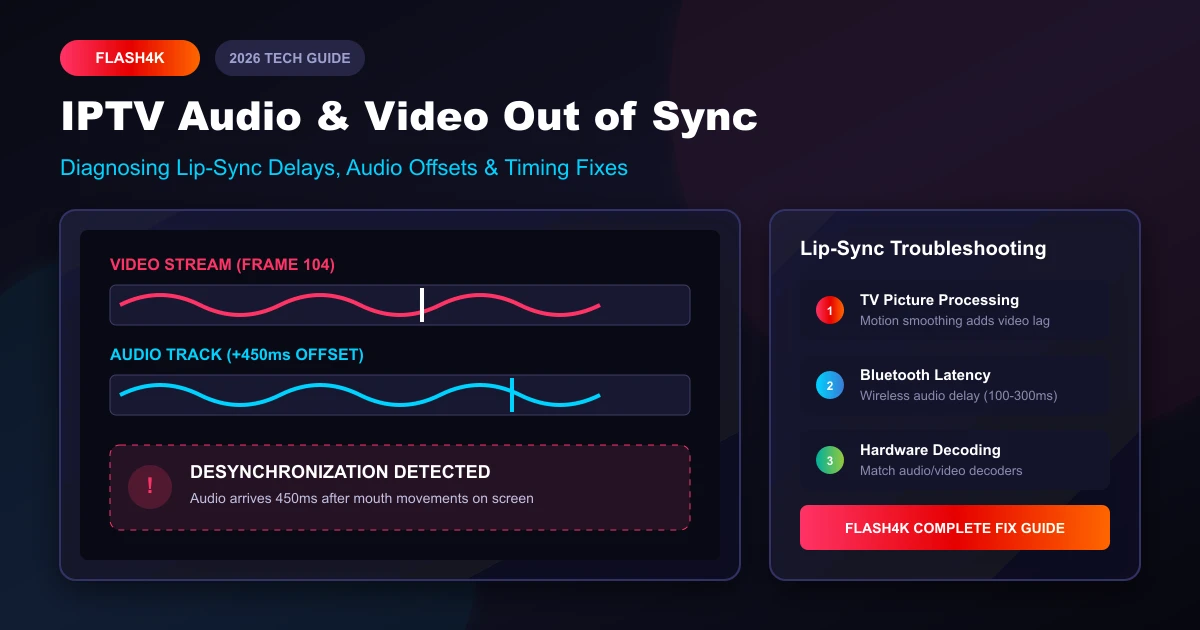
Problem 3: Video Out of Sync with Audio
- Primary Causes: Audio decoder mismatch or software rendering delays.
- Quick Fixes:
- Switch the Audio Decoder in app settings from "Software (SW)" to "Hardware (HW)".
- Use your player's built-in "Audio Offset" control to adjust sync by +/- milliseconds until commentary matches video.
For additional detailed troubleshooting steps, visit our comprehensive Flash4K IPTV FAQ page.
11. How to Prepare Before a Big NFL Game (Game Day Checklist)
Avoid missing the opening kickoff by running through this quick 5-minute pre-game checklist:
- Check Internet Connection: Run a speed test on your streaming device to confirm 25+ Mbps download speed.
- Verify IPTV Subscription: Ensure your active plan has not expired by reviewing your Flash4K platform account status.
- Open IPTV App Early: Launch your IPTV app 20 minutes before kickoff to allow EPG and channel buffers to load smoothly.
- Select Backup Channels: Identify alternative sports networks carrying the broadcast in case of primary stream overload.
- Check Audio & Display: Confirm surround sound or stereo audio is working cleanly before commentary starts.
12. Watching NFL and Live Sports with Flash4K IPTV
When searching for a reliable, high-definition sports streaming solution, Flash4K IPTV provides a premium experience tailored for live sports, movies, and international television.
Why Choose Flash4K IPTV for Live Sports?
- High Frame Rate Streams: Access live sports channels optimized for Full HD and 4K resolution at 60FPS.
- Vast Channel Library: Explore over 50,000 live channels alongside 120,000+ VOD movies and TV series via the Flash4K IPTV channel directory.
- Broad Device Compatibility: Compatible with Android TV, Firestick, Samsung & LG Smart TVs, Apple TV, MAG boxes, and mobile devices.
- Transparent Pricing: Flexible 1-month, 3-month, 6-month, and 12-month subscription options listed clearly on our Flash4K IPTV subscription plans page.
- 24/7 Dedicated Support: Instant assistance via WhatsApp or email through our Flash4K IPTV support team.
- Reseller Opportunities: Interested in starting your own IPTV business? Learn more about our Flash4K IPTV reseller program.
13. How to Choose an IPTV Service for NFL Streaming
Selecting the right IPTV provider requires evaluating several key criteria:
- Sports Coverage: Verify that the service carries major networks, regional channels, and international sports affiliates.
- Server Uptime & Infrastructure: Look for providers with redundant server infrastructure designed to handle traffic spikes during major sporting events.
- Multi-Connection Plans: Ensure the service allows multiple simultaneous connections if family members plan to watch different channels concurrently.
- Customer Support Availability: Choose a service offering fast, accessible customer service for quick resolution of technical queries.
- Clear Refund Terms: Review terms transparently on pages like our Flash4K IPTV refund policy.