What Internet Speed Do You Need for IPTV in 2026?
When transitioning to modern live protocol streaming, one of the most fundamental questions every viewer faces is: what internet speed do you need for IPTV in 2026? Whether you are watching high-stakes live sports, breaking news broadcasts, or on-demand 4K movies, your internet connection serves as the primary pipeline delivering video and audio data packets to your TV or streaming media player.
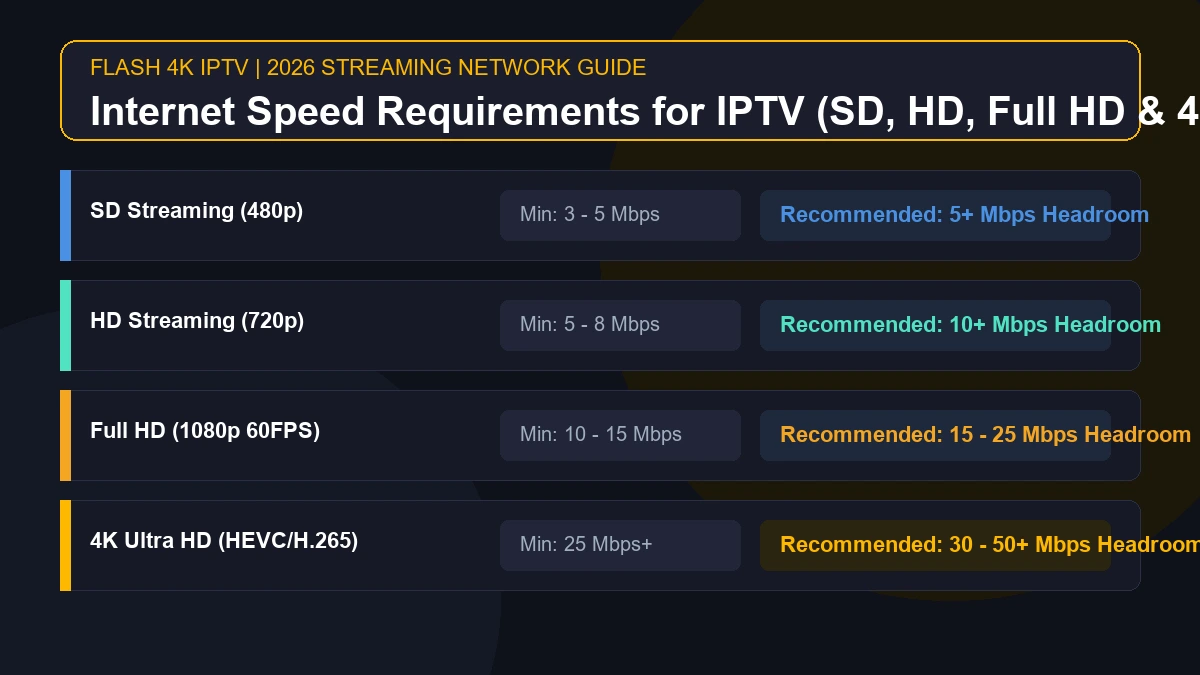
As a general practical guideline, most viewers require a minimum of 5 Mbps for standard HD (720p) streaming, 10 to 15 Mbps for Full HD (1080p 60FPS), and 25 Mbps or more for 4K Ultra HD IPTV. However, relying solely on raw download speeds does not guarantee a buffer-free viewing experience. Real-world internet requirements for IPTV depend heavily on stream bitrates, video compression codecs, local Wi-Fi signal strength, network congestion, and how many other connected devices are sharing your household connection simultaneously.
In this comprehensive 2026 guide, we will break down exact IPTV bandwidth requirements for every resolution tier, analyze how simultaneous household streams impact performance, compare Wi-Fi versus direct Ethernet connections, explain why advertised ISP package speeds differ from real device throughput, and provide step-by-step instructions to test and optimize your network for Flash 4K IPTV services.
How Much Internet Speed Does IPTV Need?
To understand how much bandwidth your streaming player consumes, it helps to look at baseline bandwidth requirements alongside recommended headroom. Headroom represents extra network capacity that absorbs temporary throughput drops, background smartphone updates, or minor Wi-Fi signal fluctuations without causing playback buffering.
The table below outlines practical IPTV internet speed recommendations for single-device playback across standard video resolution tiers:
| IPTV Quality Tier | Minimum Starting Speed | Recommended Comfort Headroom | Typical Stream Bitrate Range |
|---|---|---|---|
| SD (480p Standard Definition) | 3 – 5 Mbps | 5+ Mbps | 1.5 – 3.0 Mbps |
| HD (720p High Definition) | 5 – 8 Mbps | 10+ Mbps | 3.5 – 6.0 Mbps |
| Full HD (1080p @ 60FPS) | 10 – 15 Mbps | 15 – 25 Mbps | 8.0 – 14.0 Mbps |
| 4K UHD (2160p Ultra HD) | 25 Mbps+ | 30 – 50+ Mbps | 15.0 – 30.0+ Mbps |
Note: These speed figures represent general industry guidelines, not universal guarantees. Actual playback performance depends on stream encoding algorithms, server routing stability, receiver hardware decoding capabilities, and overall home network health.
Understanding how IPTV streaming technology works highlights why continuous data delivery is critical. Unlike traditional file downloads or pre-buffered video platforms like Netflix, live IPTV broadcasts are decoded in real time. If your connection drops below the live stream's transfer bitrate for even a couple of seconds, playback may stutter or pause.
Stream 2026 NFL Games in 4K & 60FPS
Get instant access to over 50,000 live sports channels, 120,000+ movies & series, and 24/7 priority sports coverage across all your favorite devices.
What Internet Speed Do You Need for HD IPTV?
For the vast majority of households, IPTV HD streaming (encompassing both 720p High Definition and 1080p Full HD) represents the standard viewing baseline.
A standard 720p HD broadcast typically encodes video at a bitrate between 3.5 Mbps and 6 Mbps. If you are operating a single streaming device—such as a Firestick, Android TV box, or Smart TV—a dedicated 5 to 10 Mbps connection is generally sufficient to maintain continuous playback.
However, for 1080p Full HD streaming at 60 frames per second (60FPS), which is widely used for live football, basketball, and hockey broadcasts, the required video bitrate increases significantly. 60FPS streams double the frame count to deliver smooth motion during fast-paced action. For crisp Full HD sports broadcasts, an internet speed for IPTV of 15 to 25 Mbps provides comfortable headroom.
Having extra bandwidth above the bare minimum is beneficial for several practical reasons:
- Background Data Spikes: Operating systems on Smart TVs and streaming boxes background-fetch app updates, weather widgets, and home-screen thumbnail graphics.
- Stream Bitrate Variability: Dynamic scene changes—such as camera panning across a stadium crowd—require temporary bitrate bursts from the encoder.
- Shared Home Wi-Fi: Other household members browsing social media or checking emails will consume small fragments of available throughput.
If you are setting up your TV for the first time, check out our step-by-step guide on how to set up IPTV on Smart TV in 2026 for optimal video player configuration.
What Internet Speed Do You Need for 4K IPTV?
Streaming in 4K Ultra HD delivers four times the pixel density of standard 1080p video, producing vibrant color depth and high detail. However, internet speed for 4K IPTV requires substantially greater network throughput and low latency.
While a compressed 4K stream using modern HEVC (H.265) compression can theoretically stream over a 25 Mbps line, practical real-world conditions demand more bandwidth. High-bitrate 4K live streams can burst between 25 Mbps and 40 Mbps during intense action sequences. Therefore, maintaining a baseline speed of 30 to 50+ Mbps per 4K device ensures smooth, uninterrupted playback.
Key technical factors influencing 4K IPTV bandwidth demands include:
- Video Codec Efficiency: Modern IPTV providers utilize HEVC/H.265 or AV1 compression, which cuts bandwidth demands by up to 50% compared to legacy H.264 codecs while preserving visual quality.
- Hardware Decoding Power: 4K video streams require heavy computational processing. If your streaming box features a weak CPU or insufficient RAM, frame rendering can lag even on a gigabit fiber connection.
- Network Packet Buffer Size: High-resolution streams require larger packet buffer buffers inside the IPTV app engine (such as ExoPlayer or VLC).
If you frequently experience buffering during high-definition broadcasts, explore our diagnostic article on IPTV buffering causes and solutions to isolate throughput bottlenecks.
Is 10 Mbps Enough for IPTV?
A common question from budget-conscious cord-cutters is whether a basic 10 Mbps internet package is sufficient for live TV streaming. The short answer depends entirely on your target video resolution and household device usage:
One HD Stream (720p)
Yes, 10 Mbps is usually sufficient. A single 720p HD channel consumes roughly 4 to 6 Mbps, leaving around 4 Mbps of buffer space for background network tasks.
One Full HD Stream (1080p)
Yes, but with limited headroom. A standard 1080p stream will work on a 10 Mbps line provided no other applications, smartphones, or laptops are actively using the home network at the same time.
One 4K Ultra HD Stream
No, 10 Mbps is insufficient. 4K streams require higher transfer bitrates than a 10 Mbps line can supply, leading to endless buffering circles and stream drops.
Multiple Household Devices
No, 10 Mbps is easily overwhelmed. If one person streams HD live TV while another user streams YouTube or downloads an app update, total network demand will exceed 10 Mbps, causing video stuttering.
Is 25 Mbps Enough for 4K IPTV?
In theoretical network tests, 25 Mbps for IPTV is often cited as the minimum threshold for 4K video playback. In practice, whether 25 Mbps proves sufficient depends on your network environment and viewing habits.
- Single Dedicated Connection: If your 25 Mbps connection is delivered over a stable direct Ethernet cable to a single 4K streaming box, and no other device is active, 25 Mbps can support lightweight 4K streams smoothly.
- Shared Wi-Fi Household: If your 25 Mbps speed is split over wireless Wi-Fi across multiple smartphones, tablets, and smart home appliances, real-world throughput delivered to the TV will frequently dip below 20 Mbps, resulting in buffering during 4K playback.
To achieve reliable 4K viewing, upgrading to a 50 Mbps internet tier or connecting your TV via an Ethernet cable delivers significantly higher consistency. You can compare our service tiers on the official Flash 4K pricing page to match your setup.
How Many IPTV Streams Can Your Internet Handle?
Because home internet bandwidth is a shared resource, every active smart device subtracts from the total pool of available data capacity. Understanding your cumulative household bandwidth allows you to select the right internet tier.
Here is how different standard connection speeds handle concurrent streaming workloads:
50 Mbps Internet Connection
A 50 Mbps connection serves as an excellent starting point for average families. It comfortably supports:
- Two concurrent 1080p Full HD IPTV streams (consuming ~25 Mbps total), plus
- Regular web browsing, social media scrolling, and music streaming across smartphones and laptops.
- Alternatively, it can power one 4K IPTV stream with ample headroom remaining for general household internet use.
100 Mbps Internet Connection
A 100 Mbps broadband package provides robust network capacity for multi-screen homes:
- Up to four simultaneous 1080p HD streams, or
- Two simultaneous 4K UHD streams running in different rooms without performance degradation.
- Provides sufficient headroom for online gaming, smart home security cameras, and video conferencing calls taking place concurrently.
200 Mbps – 500+ Mbps Fiber Connections
High-speed fiber connections offer maximum headroom for heavy internet households:
- Capable of driving multiple 4K IPTV streams, large background game downloads (PlayStation/Xbox), cloud backups, and multi-user remote work without bandwidth starvation.
- Important Note: Upgrading from 100 Mbps to 500 Mbps will not automatically make a single HD stream look sharper or load faster. Once your connection meets a stream's bitrate requirement with adequate headroom, additional raw speed yields diminishing returns for video quality.
IPTV Internet Speed vs Internet Stability
When troubleshooting live streaming issues, viewers often confuse raw connection speed with network stability. Understanding the technical distinction between these two performance metrics is vital:
Speed (Bandwidth): The maximum volume of data your internet pipe can transfer per second, measured in Megabits per second (Mbps).
Stability (Quality of Service): The consistency and continuous reliability of that data transfer over time, measured by latency, packet loss, and jitter.
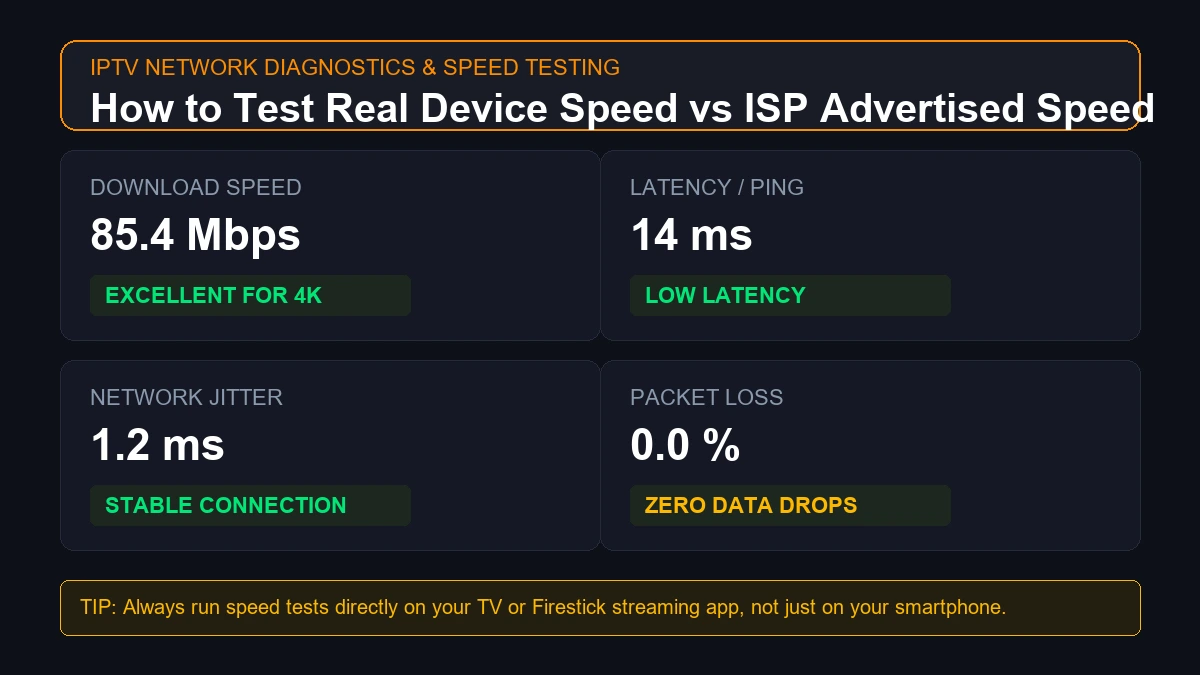 How to test internet speed for IPTV streaming
A user may subscribe to a 300 Mbps internet plan, but if their wireless connection suffers from micro-disconnects, high latency spikes (ping over 100ms), or packet loss, live video frames will be dropped. In contrast, a stable, low-latency 30 Mbps wired connection with 0% packet loss will deliver vastly superior, buffer-free IPTV performance.
If your stream freezes despite having a high Mbps package, review our detailed guide on why IPTV keeps freezing and how to fix it.
Why Your Advertised Internet Speed Is Not Always the Speed Your TV Gets
Internet Service Providers (ISPs) advertise connection speeds based on theoretical maximum throughput delivered to their modem under ideal test conditions. However, the speed received by your IPTV streaming application on a television set is frequently much lower.
Common factors causing speed discrepancies include:
- Router Distance and Structural Obstacles: Wi-Fi signals degrade rapidly when passing through concrete walls, brickwork, metal studs, and upper-floor ceilings. A 200 Mbps connection at the router may drop to 15 Mbps on a Smart TV located in a back bedroom.
- Wi-Fi Frequency Band Congestion: The legacy 2.4 GHz Wi-Fi band offers long range but limited speed and heavy channel interference from neighboring routers, micro-waves, and Bluetooth devices. The 5 GHz band offers much faster speeds but shorter physical range.
- Local ISP Network Throttling: During peak evening hours (7:00 PM – 11:00 PM), local neighborhood node congestion can reduce your available bandwidth below advertised plan rates.
- Streaming Device Processor Limitations: Inexpensive legacy streaming sticks often feature slower Wi-Fi chips and limited processing memory, creating an internal throughput bottleneck.
Wi-Fi vs Ethernet for IPTV
One of the most effective ways to optimize IPTV streaming speed and eliminate intermittent buffering is choosing the right physical connection method.
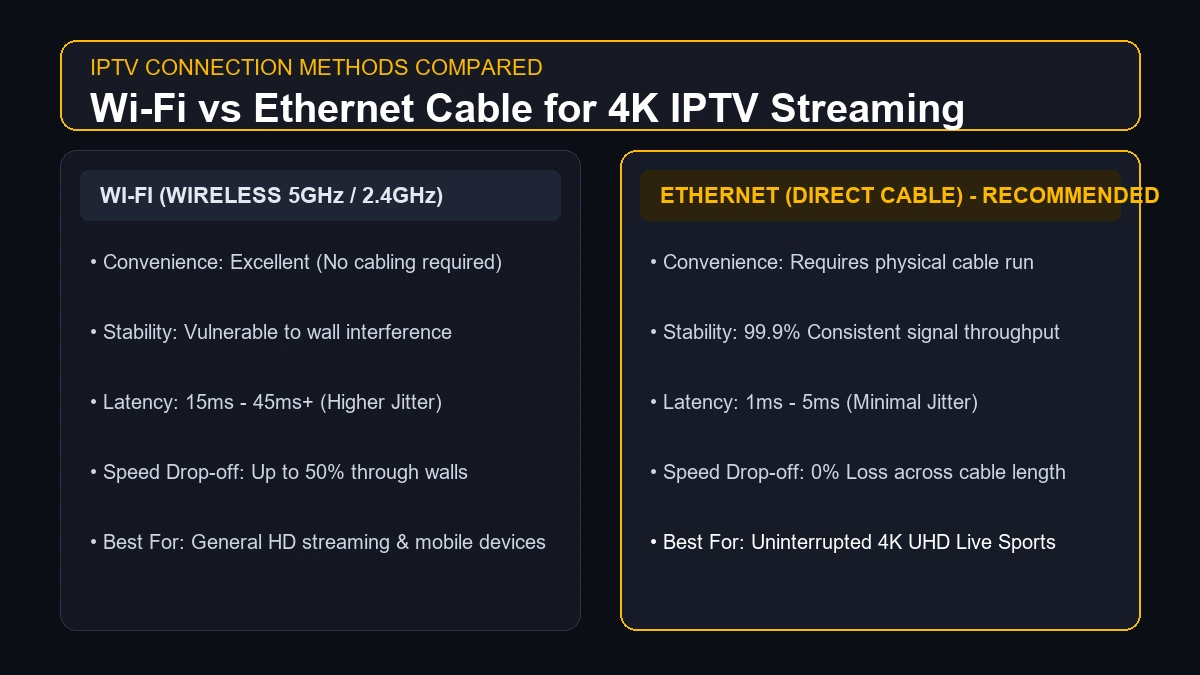 Wi-Fi vs Ethernet connection for IPTV streaming
The comparison table below highlights the practical differences between wireless Wi-Fi and direct Ethernet cabling for IPTV playback:
| Performance Feature | Wi-Fi (Wireless Connection) | Ethernet (Direct Hardwire Cable) |
|---|---|---|
| Installation Convenience | Excellent (No physical wire runs) | Requires cable routing to TV location |
| Connection Stability | Vulnerable to RF interference & wall attenuation | 99.9% stable signal throughput |
| Latency & Jitter | Higher (15ms – 50ms+ variable ping) | Ultra-low (1ms – 3ms consistent ping) |
| Packet Loss Rate | Occasional wireless packet drops | Zero packet loss under normal operation |
| 4K Streaming Suitability | Good (Requires strong 5 GHz signal) | Preferred for flawless 4K UHD performance |
While an Ethernet cable does not increase the speed of your underlying ISP subscription, it eliminates Wi-Fi signal dropouts, radio frequency interference, and latency spikes. For live sports broadcasting, hardwiring your streaming device with a Cat6 Ethernet cable is highly recommended.
How to Test Your Internet Speed for IPTV
To verify whether your current home network meets IPTV bandwidth requirements, follow this step-by-step diagnostic speed testing procedure:
- Download a Speed Test App directly on your IPTV Device: Install a speed testing utility (such as Analiti or Speedtest by Ookla) directly onto your Firestick, Android TV box, or Smart TV via its app store. Testing on a mobile phone next to the router will not reflect actual TV speeds.
- Close All Background Applications: Force-close all open video players, IPTV applications, and download tools running in the device memory before launching the speed test.
- Run the Benchmark Test: Execute the speed test to record three key metrics: Download Speed (Mbps), Upload Speed (Mbps), and Latency/Ping (ms).
- Evaluate Download Throughput: Ensure your download speed meets the minimum requirements for your preferred stream quality (e.g., 25+ Mbps for 4K).
- Check Latency and Jitter Values: Ideal latency for live streaming should be under 30 ms. Jitter (variation in ping) should ideally remain below 5 ms.
- Perform Tests at Different Times of Day: Test your connection during off-peak hours (morning/afternoon) and peak evening viewing hours to identify potential ISP throttling or local network congestion.
- Test Both Wi-Fi and Hardwired Ethernet: Run a speed test over Wi-Fi, then plug in an Ethernet cable and test again to determine how much bandwidth your wireless signal is losing.
- Check Concurrent Household Activity: Run a test while other family members stream videos or play games online to measure real-world available bandwidth under load.
- Test Your Actual IPTV Stream: Launch your Flash 4K IPTV playlist and observe stream statistics inside the player menu (such as bitrate and frame drop counters) for real-world verification.
What Internet Speed Do You Need for Multiple IPTV Devices?
If your household operates multiple televisions, total IPTV internet speed demands scale based on concurrent active connections:
- Single-Device Household: 15 – 25 Mbps provides ample capacity for one 1080p or 4K screen.
- Two-Device Household: 35 – 50 Mbps accommodates two simultaneous high-definition streams across living room and bedroom TVs.
- Three or More Devices: 100+ Mbps ensures multi-room viewing without buffer conflict or network slowdowns.
The table below provides practical capacity guidelines for multi-device household configurations:
| Household Setup Configuration | Suggested Minimum Capacity | Recommended Ideal Internet Tier |
|---|---|---|
| 1 HD IPTV Device | 10 Mbps+ | 25 Mbps Plan |
| 1 Full HD Device (1080p 60FPS) | 15 – 25 Mbps | 50 Mbps Plan |
| 1 4K UHD Device | 25 – 30 Mbps | 50 – 100 Mbps Plan |
| 2 Concurrent HD Devices | 20 – 30 Mbps | 50 Mbps Plan |
| 2 Concurrent High-Quality (4K/FHD) Streams | 50 Mbps+ | 100 Mbps Plan |
| 3+ Concurrent 4K Devices + Heavy Browsing | 100 Mbps+ | 200 – 500+ Mbps Fiber Plan |
Stream 2026 NFL Games in 4K & 60FPS
Get instant access to over 50,000 live sports channels, 120,000+ movies & series, and 24/7 priority sports coverage across all your favorite devices.
How Other Devices Affect IPTV
Every connected internet appliance in your home shares the same internet bandwidth pool. When high-bandwidth activities run concurrently on secondary devices, they can choke the data flow to your IPTV player.
Common bandwidth-intensive household activities include:
- 4K Netflix, Disney+, or YouTube Streaming: Consumes 15 – 25 Mbps per stream.
- Console & PC Game Downloads: Steam, PlayStation Network, and Xbox updates frequently saturate 100% of available bandwidth during automated background updates.
- Cloud Storage Backups: Apple iCloud, Google Photos, or OneDrive background media syncing consumes significant upload and download bandwidth.
- Remote Work Video Calls: Zoom, Microsoft Teams, and Google Meet video conferences demand 3 – 8 Mbps of continuous bi-directional throughput.
- Smart Home Security Cameras: Multi-camera systems streaming live HD footage to cloud servers consume continuous upload bandwidth, which can saturate weaker Wi-Fi routers.
If your IPTV works flawlessly during the day but stutters when family members return home, review our cross-device diagnostic guide: IPTV works on one device but not another.
What Internet Package Should You Choose for IPTV in 2026?
Selecting the optimal internet package requires matching your plan to your household size and viewing preferences:
Light IPTV User (Single HD TV)
- Recommended Package: 25 Mbps Broadband Plan
- Ideal for individuals or couples operating a single HD television for casual news, series, and live channels.
Full HD Sports & Entertainment User
- Recommended Package: 50 Mbps Broadband Plan
- Ideal for sports enthusiasts streaming 1080p 60FPS broadcasts while managing light internet usage across smartphones and laptops.
4K Ultra HD Enthusiast
- Recommended Package: 100 Mbps Fiber/Cable Plan
- Provides reliable bandwidth headroom for crisp 4K UHD streaming, fast channel zapping, and simultaneous household internet activity.
Multi-Device Family Household
- Recommended Package: 200 – 500+ Mbps Fiber Plan
- Designed for large households with multiple smart TVs, active online gaming, video calls, and dozens of connected smart home appliances.
For full details on device compatibility across different network speeds, visit our dedicated Flash 4K supported devices page.
Common IPTV Internet Speed Mistakes
To ensure optimal performance, avoid these 10 common internet speed pitfalls:
- Relying Only on Advertised ISP Speeds: Assuming a "100 Mbps plan" automatically guarantees 100 Mbps on a TV connected across three concrete walls.
- Ignoring Wi-Fi Signal Quality: Blaming the IPTV provider for buffering when the real issue is weak 2.4 GHz Wi-Fi coverage.
- Running a Single Speed Test: Testing your connection once in the morning and assuming speed remains identical during peak evening viewing hours.
- Overlooking Background Household Downloads: Forgetting that an automated game console update can consume your entire network bandwidth during a live match.
- Assuming 100 Mbps Guarantees Smooth Playback: Overlooking high latency, jitter, or packet loss issues that disrupt stream decoding despite high download speeds.
- Misdiagnosing Server Issues as Slow Speed: Assuming buffering is caused by internet speed when an unoptimized app player engine is at fault.
- Using Weak Built-In TV Wi-Fi Chips: Relying on low-power Wi-Fi receivers built into budget Smart TVs instead of hardwiring Ethernet or using a high-performance streaming stick.
- Neglecting Router Firmware Updates: Running outdated router software that degrades packet routing efficiency over time.
- Streaming Multiple 4K Channels Simultaneously Unnecessarily: Leaving active 4K streams running in unoccupied rooms, saturating home bandwidth.
- Expecting Speed Upgrades to Fix Poor Stream Sources: Assuming upgrading to a gigabit connection will fix an unoptimized low-quality stream source.
How to Get Better IPTV Performance Without Upgrading Your Internet Plan
Before spending extra money to upgrade your monthly broadband subscription, try these 10 practical network optimization tips:
- Connect via Ethernet Cable: Replace wireless Wi-Fi with a direct Cat6 Ethernet cable connection between your router and streaming device.
- Switch to the 5 GHz Wi-Fi Band: If hardwiring is impossible, connect your IPTV device to your router's 5 GHz Wi-Fi band rather than the congested 2.4 GHz band.
- Move Router Closer to the TV: Reduce distance and physical wall barriers between your wireless router and your streaming box.
- Pause Large Household Downloads: Schedule game updates, cloud backups, and large software patches to run outside your primary viewing hours.
- Power Cycle Network Equipment: Restart your modem, router, and streaming box once a week to clear RAM caches and reset routing tables.
- Use External Streaming Hardware: Upgrade from slow built-in Smart TV apps to dedicated streaming hardware like an Amazon Firestick 4K Max or Apple TV.
- Optimize Player Buffer Settings: Increase the pre-buffer size (e.g., from 2 seconds to 5–10 seconds) inside your IPTV player app settings.
- Change Wi-Fi Channels: Use a Wi-Fi analyzer app to identify and select less congested wireless channels on your router settings.
- Enable Quality of Service (QoS): Access your router admin dashboard and assign highest bandwidth priority to your IPTV streaming device MAC address.
- Keep Applications Updated: Ensure your IPTV player app and device OS are updated to the latest software versions for optimized decoding.
If you encounter technical questions during setup, visit our comprehensive Flash 4K FAQ section or reach out directly to the Flash 4K support team.
Internet Speed Recommendations for Flash 4K IPTV
At Flash 4K IPTV, our infrastructure is engineered to deliver crisp, high-bitrate live television, sports, and VOD streams with minimal buffering latency. To get the absolute best visual fidelity from our premium channels, we recommend evaluating your home streaming environment holistically:
- For Crisp 1080p Live Sports: A stable 15 to 25 Mbps hardwired connection provides smooth 60FPS rendering for fast-action live broadcasts.
- For Premium 4K UHD Streams: A consistent 30 to 50+ Mbps connection ensures full dynamic range, vibrant color depth, and rapid channel switching response.
- For Multi-Screen Subscriptions: Ensure your home network plan provides sufficient cumulative bandwidth (~25 Mbps per active stream) so family members can watch simultaneously in different rooms.
Whether you are configuring a Smart TV, Firestick, Android box, or MAG device, explore our complete library of Flash 4K installation guides for tailored device setup instructions.
Frequently Asked Questions
Conclusion
Determining what internet speed you need for IPTV in 2026 comes down to balancing resolution requirements, household device usage, and connection stability. While 5 to 10 Mbps serves basic HD streaming, stepping up to 25 to 50+ Mbps over a hardwired Ethernet connection ensures a flawless, buffer-free 4K viewing experience.
Remember that raw download speed is only one piece of the puzzle—maintaining continuous network stability, minimizing packet loss, and managing local device congestion are equally critical.
Ready to elevate your home entertainment experience? Explore Flash 4K IPTV subscription plans today and access thousands of premium live channels, live sports, and 4K VOD content delivered with ultra-low latency!